Stop sorting.
Start creating.

Drop a folder of stems, one-shots, or raw session dumps into Dr. Session. It listens to what is actually inside every file, sorts it, renames it, and if you work in Ableton it builds the whole session for you.

Checkout not opening? Buy now →

LAUNCH PRICE. GOING TO $39 AFTER THE FIRST REVIEWS COME IN.

The same folder, before and after.

BEFORE

A folder of mystery bounces. Names like Untitled 3 and stem_ tell you nothing about what's inside.

AFTER

About a minute later, the same folder is grouped, named, colored and dropped into your own template, ready to mix.

ILLUSTRATION OF THE OUTPUT, DRAWN TO THE APP'S REAL TRACK NAMES AND GROUP COLORS.
NOT A SCREENSHOT. REAL CAPTURES GO IN THE GALLERY BELOW ONCE THE DEMO FOLDER IS SHOT.

WHAT IT DOES

The main features.

Get the hour back, every session.

Sorting stems before you can even start is real time, gone from every single session. Drop the folder and get it organized in about a minute instead. That is the whole pitch: the price is less than the time it saves you once.

It listens instead of reading filenames.

No guessing from audio 03-1.wav or print 04.wav. Dr. Session decodes the actual sound with a neural audio model, so it knows a kick from a vocal from a synth pad no matter what the file is called. Works on the messiest folders: unlabeled exports, old bounces, someone else's stem dump.

Builds the real Ableton session, not just folders.

For Ableton producers it goes further: a ready-to-mix .als with every clip already on the right, correctly colored, correctly named track. Open it and start mixing on the first beat. Works with Live 11 and Live 12.

Injects straight into your own template.

Your groups, your sends, your colors, your routing, untouched. It drops the classified stems into the template you already build every session around, instead of a generic one.

Learns your library the more you use it.

Correct a misclassified file once and the Learning Engine remembers. Every session gets more accurate, tuned to your specific sound.

100% local: your audio never leaves your Mac.

No cloud, no upload, no subscription. Everything runs on your own machine, and it works before you have even opened Ableton.

THE APP

What it actually looks like.

The real app on a real 28-file session, dropped in unlabeled and sorted by sound: 8 drums, 1 bass, 9 synths, vocals, strings, FX, and the full mix flagged as the reference.

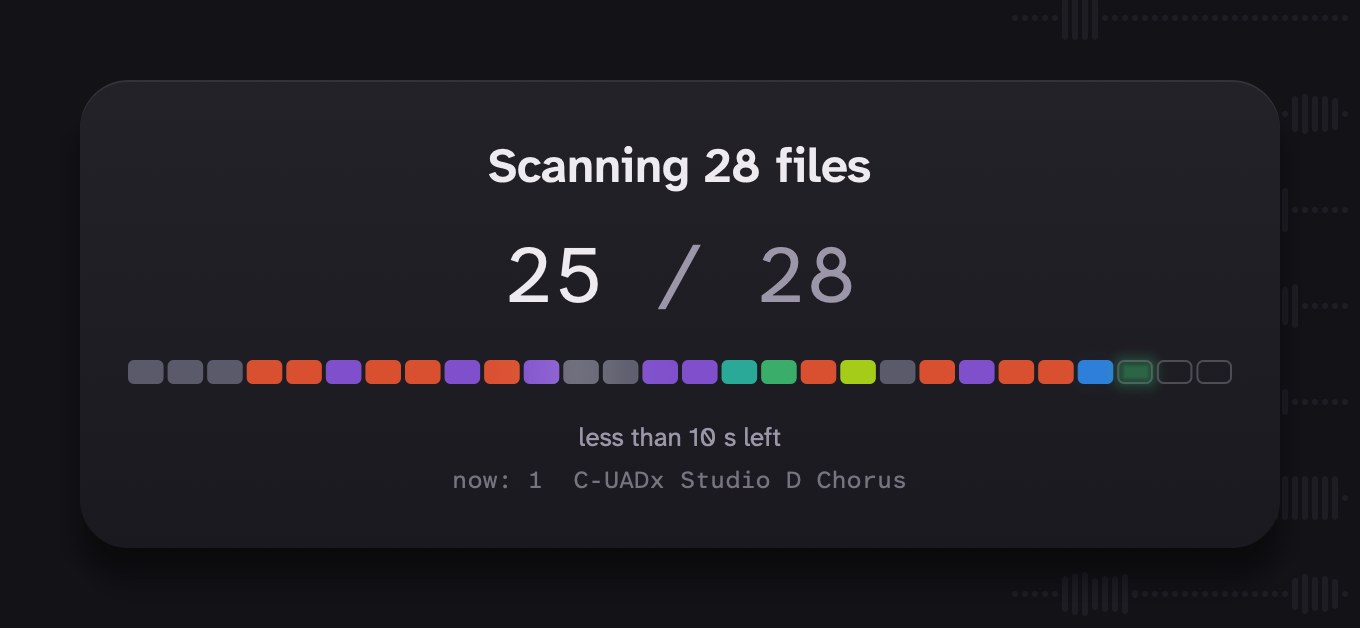
The scanning card: 'Scanning 28 files', 25 of 28 done, a row of slots filling in with each file's group color as it is classified, less than 10 seconds left, and the file it is listening to now.
While it listens: each file lands in its group's color as it's classified. 28 files took about a minute on first run.
Details for one stem: what it heard, how sure it is, tonal balance, stereo image and mono check.
Filter by group or what needs a look, sort by type, name or peak.
In Ableton Live: every stem on a named, correctly colored track.

REQUIREMENTS

What you need to run it.

MACOS
12 Monterey or later
CHIP
Apple Silicon only, M1 and later
FORMAT
Standalone app, not a plugin
SESSION BUILD
Ableton Live 11 and 12, other DAWs not promised yet
AUDIO FILES
WAV, AIFF, MP3, FLAC, OGG
FIRST LAUNCH
Installs the audio engine once, needs internet and a few minutes
INTERNET
First launch, then only periodic license checks
PROCESSING
Fully on device, no uploads
LICENSE
Perpetual, deactivate in the app to move it

PRICING

Pay once, keep it.

No subscription, no cloud fees, no account to manage. One license unlocks organizing, session building, and stem splitting, and every update in this version.

LAUNCH PRICE $19.90.
GOING TO $39 ONCE THE FIRST REVIEWS ARE IN.

$19.90
ONE TIME · PERPETUAL LICENSE
Buy Dr. Session

Checkout not opening? Buy now →

Secure checkout.
macOS 12+, Apple Silicon.

FAQ

Straight answers.

My stems have terrible names. Does it still work?

That's the whole reason it exists. Dr. Session never reads your filenames. It decodes the audio and classifies each stem by how it sounds, so files like audio 03-1.wav and print 04.wav all land in the right place.

Does it work with DAWs other than Ableton?

Organizing and renaming works for any setup, the output is just folders and files. Full session building targets Ableton Live 11 and 12 today. More session formats are not promised yet.

Is it a plugin?

No. It is a standalone Mac app. You never load it inside your DAW, it works on folders and writes sessions for you to open.

How accurate is the classification?

Good on normal drum, bass, vocal, and synth material. Unusual one-shots, layered stems, and heavily processed sounds can land in the wrong group. Fixing one takes a click and the Learning Engine picks it up.

Does my audio get uploaded anywhere?

No. Classification and stem separation both run on your Mac. The only network activity is the first-launch setup and a periodic license key check.

Will it run on an Intel Mac?

No. Dr. Session needs Apple Silicon, M1 or later, on macOS 12 or newer. If you're on an Intel Mac, don't buy this yet.

Does it move or rewrite my original files?

It copies into a new organized structure and leaves your source folder as it was, so a bad guess never costs you the original.

I make sample packs, is this useful without a DAW?

Yes, and that is a real use case already. Sorting raw one-shots into clean, named folders is the first feature and needs nothing else installed.

What happens after I buy?

You get your license key and a download link by email, right after checkout. The license is perpetual.

Who made this?

One person, working out of Berlin. I'm an audio engineer, and I built Dr. Session because the same hour kept disappearing out of my own sessions, dragging stems onto tracks by hand. Email support and you get me.

The time you lose to messy folders, gone.

Checkout not opening? Buy now →

$19.90 · one-time Get it